Spotter
A fitness log you keep by talking to your assistant.
Tell your assistant what you lifted, ate or weighed. Spotter stores it and works out your bests, trends and goal pace in code, and your assistant quotes those numbers.
What it looks like
Am I on track for my goals?
All three goals are on track by projection.
Body weight 77 kg by Tue 5 Jan 2027.
79.01 kg now against 78.96 kg on the plan line today: 0.05 kg behind.
At this pace it is reached on Sat 26 Dec.
Back Squat 120 kg by Tue 2 Feb 2027.
107.9 kg now against 99.8 kg on the plan line today: 8.1 kg ahead.
At this pace it is reached on Thu 26 Nov.
Outdoor Run 5 km in 27:00 by Tue 5 Jan 2027.
29:30 now against 29:48 on the plan line today: 18 seconds ahead.
At this pace it is reached on Sat 12 Dec.
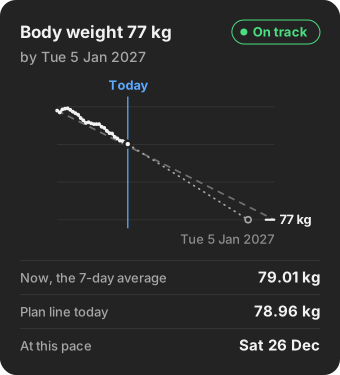
An example. The assistant asked Spotter for the goals and quoted them. The Goals page shows the same numbers.
Before you start
- You need an AI assistant that can add a remote MCP server with sign-in.
- Each assistant's plan limits are in the README's table.
How to start
-
Sign in.
Your first sign-in creates your account.
-
Add Spotter to your assistant.
Add Spotter to your assistant as a remote MCP server. Some call it a custom connector. Its address:
https://spotter-production-0c0f.up.railway.app/mcpThere is no key to paste: your assistant opens the sign-in page. Sign in with the same account you use here.
-
Say what you did.
Start a new chat and say what you did, or one of the sentences below.
The first time, your assistant may ask you to allow each call. Allow it.
How to add Spotter in each assistant
- Claude apps
- Claude Code
Run this once, then type
/mcpand pick spotter to sign in.claude mcp add --transport http --scope user spotter https://spotter-production-0c0f.up.railway.app/mcp - ChatGPT
- Cursor
- VS Code with Copilot
- Gemini app
- Mistral
- goose
Any other MCP client that supports remote servers with sign-in is added the same way.
Things to say first
Am I on track for my goals?
Each goal against its plan line, and the date it is reached at this pace.How am I doing?
Your weight trend, calories a day, lift sessions, cardio and maintenance.Lunch was two rotis and dal.
Logs the meal. Each number is tagged: you said, saved food, USDA or estimate.
Everyday logging
- Back squat, 3 sets of 5 at 60 kg
- I weighed 72.5 kg this morning
- 30 minutes on the treadmill
Your data
- You decide what your assistant may do. A switch on Settings has two settings: "Read, log and delete" and "Read and log". It starts at "Read, log and delete".
- Export. Settings gives you everything you have logged, as a zip of CSV files.
- Undo. Right after a delete, Undo brings the entry back. Your assistant can restore an entry it deleted.
- Delete your account. On Settings. It removes every entry and your sign-in, and it cannot be undone.
How it is built
- 22
- functions your assistant can call, over MCP.
- 35
- eval cases. Each checks the calls the server received, not what the assistant says it did.